September 22, 2026 · 5 min read
How livestream and video rendering work
A Samay Raina episode, a drag on the bar, a drop in quality, then a live feed that never writes a last line.

I tap Play on a Samay Raina episode that runs about forty minutes. I already know the first twelve minutes are setup, so I drag the bar to eighteen.
I used to think Play meant the browser downloaded one video file, the way it downloads a PDF. Seek would be a skip inside that file, quality would be a smaller copy of the same file, and live would be that file still being written. None of that is what the player actually does.
The first fetch is a menu
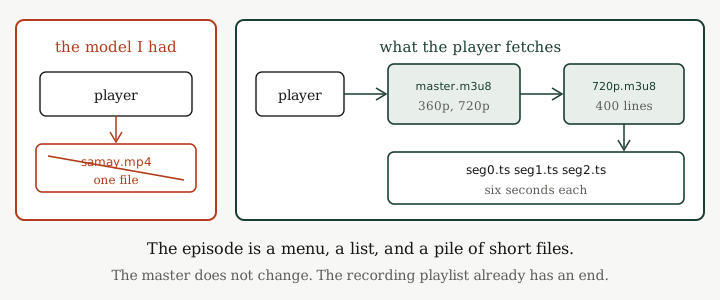
The player does not ask for samay.mp4. It asks for a small text file, usually named master.m3u8. That file is a menu. It lists 360p and 720p, each pointing at another text file. That menu is the master playlist. On this recording it does not change.
The player picks 720p and fetches 720p.m3u8. This one is the media playlist: a list of slices, not the video itself. Each entry has a duration and a URL.
#EXTM3U
#EXT-X-TARGETDURATION:6
#EXTINF:6.000,
seg0.ts
#EXTINF:6.000,
seg1.ts
...
#EXTINF:6.000,
seg399.ts
#EXT-X-ENDLIST
A segment is a few seconds of encoded video at its own URL. Mine are six seconds each. Four hundred of them. #EXT-X-ENDLIST is how the player knows this list is finished. Add the durations: 2400 seconds, forty minutes. That is how the scrubber knows the length before a single frame has been decoded.
Play starts by downloading seg0.ts, drawing it, and fetching a couple ahead. The episode is still four hundred files on the origin. The player is holding three of them.
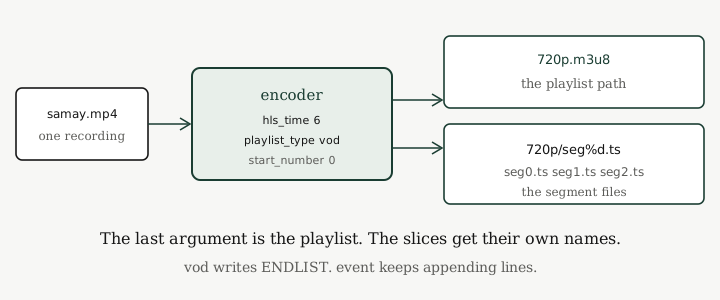
Those files came from an encoder. The command reads samay.mp4 and writes the playlist plus the slices. The last argument is the path of the .m3u8 file.
ffmpeg -i samay.mp4 \
  -codec:v libx264 \
  -codec:a aac \
  -hls_time 6 \
  -hls_playlist_type vod \
  -hls_segment_filename "720p/seg%d.ts" \
  -start_number 0 \
  720p.m3u8
-i is the recording. -hls_time 6 is why every #EXTINF says 6.000. vod means a finished recording, so the encoder writes #EXT-X-ENDLIST. -hls_segment_filename is how each slice is named, %d becoming 0, 1, 2. -start_number 0 is why the first file is seg0.ts. 720p.m3u8 is the playlist the player fetches after the master.
The master is not that last argument. I run the same command again for 360p.m3u8. Then I write master.m3u8 by hand, two lines pointing at those playlists. That menu is what does not change.
Eighteen minutes is a line in a list
I drag the bar to 18:00.
If this were one file, the player would request a byte range inside it. It is not one file. It already has the playlist, and every line already has a duration. Eighteen minutes is 1080 seconds. Walk the list, adding 6.000 each time, until the running total covers 1080. That lands on seg180.ts. The player GETs that URL. It does not download segments 0 through 179.
That is seek. Arithmetic on a finished list, then one GET.
360p is a different list
The hotel wifi drops. The player decides 720p is too fat.
It does not shrink the segments it already has. It fetches 360p.m3u8, the playlist from the second encode. Same forty minutes, same six-second steps, different files. 360p/seg180.ts is the same slice as 720p/seg180.ts, encoded smaller.
The player is a few seconds into segment 180. It downloads the 360p copy of that chunk and keeps going. Open the other playlist, resume from the matching segment. The master did not change.
The live playlist has no last line
Someone in the room says he is live. I switch to that feed.
The master still lists 360p and 720p. The master still does not change. The media playlist is the thing that is different.
There is no #EXT-X-ENDLIST. The file has the segments so far and then it stops. The encoder is still cutting slices and appending them. Same command as the recording, except -hls_playlist_type event. event means the playlist may only grow: new lines at the bottom, no last line until the encoder stops.
The player cannot add up a total duration. The scrubber has no 40:00. “Now” is the last segment the playlist currently admits. I cannot seek past that line. That file does not exist yet.
So the player polls. Every few seconds it GETs 720p.m3u8 again. New lines appear: seg401.ts, then seg402.ts. The player downloads each new segment and draws it. That is live. Not a socket that streams forever. A text file that grows, and a loop that keeps reading it.
On this feed the old lines stay. A late joiner can rewind to seg0.ts the same way I sought the recording, as long as those objects are still on the origin.
The list that sheds its first line
I still talk about “the video” when the CDN log is four hundred objects and two playlists. Seek worked because the playlist was finished. Quality worked because a second finished playlist covered the same timestamps. Live works because that list has no end, so the player has to keep asking.
Plenty of live playlists do not only grow. They drop the oldest line when they add a new one, and they bump a sequence number so seg0 in this fetch is not the seg0 from ten minutes ago. The episode was the append-only kind. The other kind looks like the same .m3u8 until you notice the top of the list moving.
If this is useful, wrong, or incomplete, write to me.